
Windows Endpoint Security & Threat Detection
Lock down accounts, control file access, harden the network, and monitor for threats — then practice responding fast when a Windows environment gets attacked.
Security-WINSEC-I

Intermediate
.svg)
English
English

About The Lab
Prerequisites


Windows Basics
Audiences
Lab Architecture
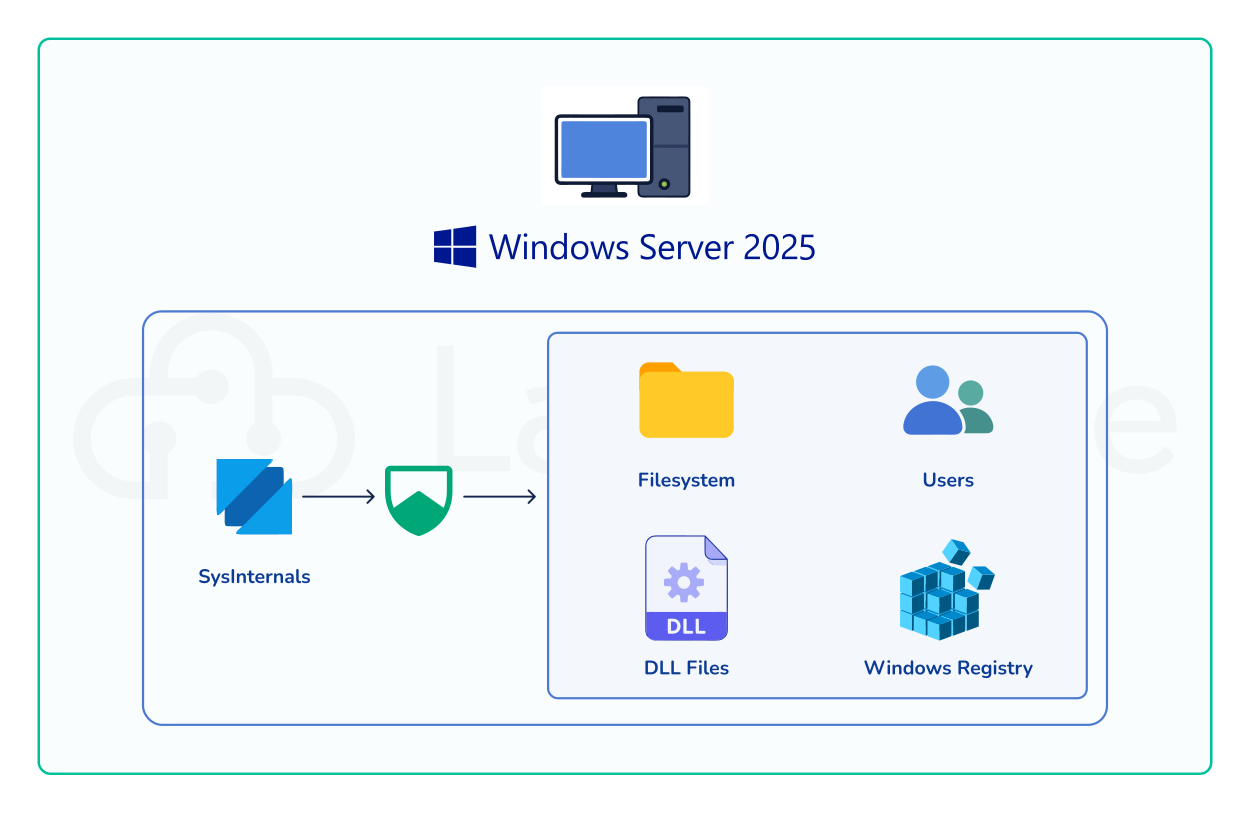
This Hands-on lab consists of a Windows Server 2025 environment paired with SysInternals tools. You will use this environment to inspect and secure the filesystem, users, DLL files, and Windows Registry.
Why this Lab ?
Learn how to protect Windows computers and networks from real attacks. In this hands-on lab, you'll practice locking down user accounts, controlling who can access files, securing the network, and monitoring systems for suspicious activity. By the end, you'll know how to harden a Windows environment and respond quickly when something goes wrong.
Lab Objectives
- Gain a deep understanding of Windows security architecture and its role in enterprise defense.
- Configure identity, access control, and file system permissions to enforce least privilege.
- Harden network security using Windows Defender Firewall and traffic analysis tools.
- Enhance visibility and threat detection with advanced auditing, Sysmon, and Sysinternals utilities.
- Prepare for real-world incident response using PowerShell security and forensic data collection.